
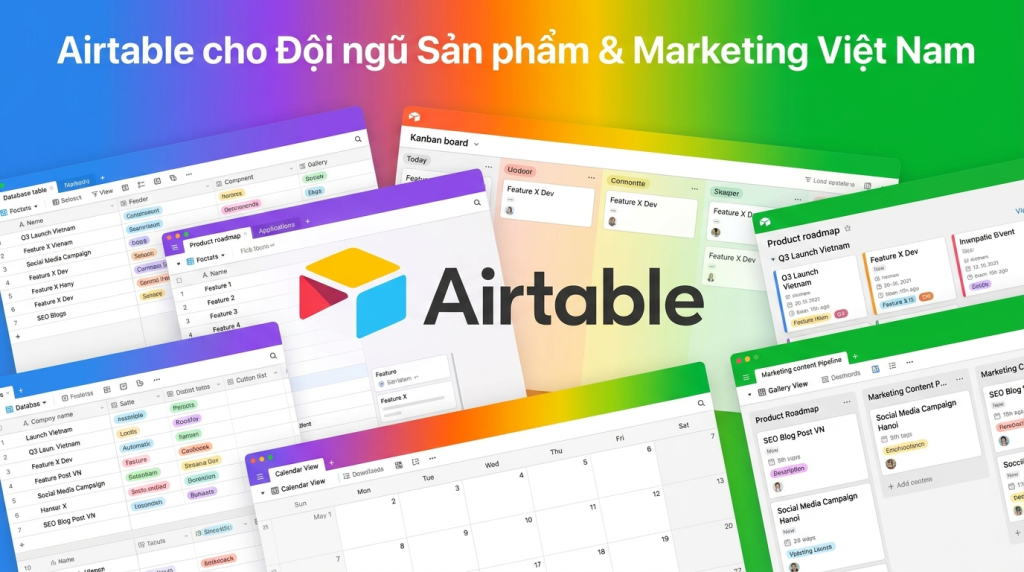
Product team và team marketing tại Việt Nam thường dùng combo Notion + Sheets + Trello, và đau khổ vì data rời rạc. Airtable thay được cả 3 với power database. Bài này hướng dẫn 5 use case cụ thể cho team 5-15 người.
Vì sao Airtable hợp với product team và marketing
3 nhu cầu chung của hai team này:
- Quản lý 30-200 item (bài viết, post, feature, bug) cùng lúc, có quan hệ phụ thuộc
- Cần nhiều view khác nhau cho cùng dữ liệu (Calendar, Kanban, Gallery)
- Linked records: bài viết link KOL, feature link customer feedback, post link campaign
- Form thu thập từ ngoài (idea submission, content brief, bug report)
- Tự động hoá nhẹ: notify khi đổi status, send email, fetch metric
Airtable cho làm tất cả không cần dev. Airtable bản quyền qua TND đi kèm template ngành VN miễn phí.
Use case 1: Content marketing calendar
Cấu trúc base "Content Hub"
- Posts: Title, Status (Idea/Drafting/Review/Published), Channel, Writer, Editor, Deadline, URL, Topic link, Campaign link
- Topics: Keyword, Search volume, Cluster, Priority, Brief link
- Writers: Name, Specialty, Rate, Capacity tuần này
- Campaigns: Campaign name, Goal, Start-End, Budget, Posts linked
- Assets: File link, Type, Tag, Used in posts
View bắt buộc
- Calendar deadline: nhìn deadline 1 tháng tới
- Kanban theo Status: drag từ Drafting → Review → Published
- Grid "Quá hạn": filter deadline < TODAY và status ≠ Published
- Gallery thumbnail published: portfolio nhìn trực quan
- Personal view mỗi writer: filter assigned to ME
Automation hữu ích
- Status → Review: notify editor qua Slack
- Deadline còn 2 ngày: reminder writer qua email
- Published: post link vào Slack #content-published
- Update mỗi tuần: ghi số word, view, share vào row
Use case 2: Social media planning đa kênh
Team marketing chạy 4-6 kênh (Facebook, LinkedIn, TikTok, Instagram, YouTube, Email). Mỗi post format khác nhau:
Base "Social Calendar"
- Posts: Title, Channel, Format (Reel/Carousel/Text/Video), Caption, Asset link, Scheduled time, Status
- Series: Series name, Total posts, Theme
- Hashtags: Theo niche, hot/normal/avoid
- Metrics: Post link, Reach, Like, Comment, Save, Date snapshot
View đặc thù
- Calendar weekly: nhìn lịch đăng 7 ngày
- Kanban theo channel: từng channel có làn riêng
- Gallery scheduled: preview thumbnail và caption
- Performance leaderboard: post top reach, top engagement
Tích hợp
- Buffer/Hootsuite/Publer: thay vì native scheduler
- Hoặc Airtable webhook → n8n → Meta/TikTok API direct publish
- Metrics fetch hàng đêm từ Meta Insights API
📌 Cần template Airtable cho marketing team? TND có sẵn 8 template cho ngành. Nhắn Messenger →
Use case 3: Product roadmap và OKR tracking
Product team 5-15 người cần track sprint, roadmap quý, OKR năm trong cùng nơi.
Base "Product OS"
- OKRs: Objective, Quý, Owner, Status (Off/At Risk/On Track), Key Results
- Key Results: KR title, OKR link, Target, Current, %, Last update
- Initiatives: Initiative name, OKR linked, PM, Status, Quarter
- Features: Feature name, Initiative link, Status (Discovery/Spec/Building/Shipped), Customer impact
- Customer feedback: Source, Tag, Quote, Linked Feature
View dùng nhiều
- Dashboard OKR: % completion theo quý, sort theo Owner
- Roadmap Gantt: Features theo timeline
- Sprint board Kanban: feature đang sprint hiện tại
- Feedback theme: gallery quote khách hàng, group theo Feature
Connect với tool kỹ thuật
- Linear/Jira: sync ticket status 2 chiều
- GitHub: PR merged → update Feature status
- Slack: weekly OKR digest tự gửi #leadership
Chi tiết integration xem Airtable automation tích hợp Zapier và n8n.
Use case 4: Asset library cho thương hiệu
Marketing team có 200-2000 asset (logo, banner, hero image, video, photo), phân tán mọi Drive là disaster.
Base "Brand Assets"
- Assets: Thumbnail (Attachment), Name, Type, Tags, Rights expire, Used in
- Campaigns: Name, Assets used
- Photographers/Designers: Name, Specialty, Rate
- Briefs: Brief name, Output assets linked
View và quy tắc
- Gallery với cover: visual search nhanh
- Filter theo Tag: brand-color, lifestyle, product-shot, hero, social
- Rights expire alert: photo có hợp đồng, Airtable nhắc 30 ngày trước
- Form upload: designer ngoài upload qua public form, không cần Airtable account
Use case 5: Customer research và user interview
Product/UX research team phỏng vấn 5-30 user/tháng, cần phân tích cross-interview.
Base "Research"
- Interviews: User name, Persona, Date, Recording link, Transcript link, Researcher
- Insights: Quote, Interview link, Theme, Sentiment, Priority
- Themes: Theme name, Count, Linked Features (cho product team)
- Personas: Name, Demographics, Goals, Pain points
Highlight reel
- Gallery insight có quote dài: dùng cho slide báo cáo
- Group by Theme: phát hiện theme lặp lại 5+ interview = problem thật
- Link Theme → Feature: insight đẩy roadmap có dữ liệu thật
Case study: Team marketing 12 người tại TP.HCM
Startup SaaS B2B (tools cho doanh nghiệp Việt), team marketing 12 người (3 content, 2 social, 2 design, 2 paid, 2 SEO, 1 lead), chuyển từ (Notion + Trello + Drive + Sheets) sang Airtable Team năm 2025:
- Trước: brief Notion → content Trello → asset Drive → metric Sheets. Mất 4-6h/tuần copy data giữa các tool
- Setup Airtable 3 tuần: 4 base (Content, Social, Asset, OKR), 11 table linked records
- Tích hợp: n8n connect Buffer, Meta Insights, Slack, ClickUp dev
- Sau 4 tháng: 1 nguồn sự thật cho mọi metric marketing
- Tiết kiệm thời gian: 5h/người/tuần (~720h/quý cho 12 người)
- Phát hiện: 28% content xuất bản chậm 7+ ngày, đã rebuild quy trình review
- Tiết kiệm SaaS: 92 triệu/năm (bỏ Notion Team, ClickUp Premium, Trello Business)
Best practice riêng cho product/marketing
- Interface dashboard: Lead chỉ cần dashboard, không truy cập base raw
- Form public: thu brief từ stakeholder không có Airtable account
- Sync với Slack: notify đúng channel theo loại update
- Permission rõ ràng: writer chỉ thấy bài mình, editor xem hết
- Backup snapshot: bật auto, export CSV weekly
- Đặt naming chuẩn: BaseName-ItemType-Description, ví dụ "Content-Blog-Q2-Pillar"
Anti-patterns cần tránh
- 1 base siêu khổng lồ với 15 table, chia thành 3-4 base theo domain
- Để mọi user là Creator, tốn license, review role 3 tháng/lần
- Không dùng Linked record, duplicate data dẫn tới sai số liệu
- Automation chain 8 step, nên dùng n8n cho workflow phức tạp
- Không đặt View permission, junior tự xoá filter của lead
So sánh Airtable với Notion, Sheets cho product/marketing
- Airtable: thắng khi cần database, linked records, view đa dạng, automation
- Notion: thắng khi cần wiki + doc + database nhẹ. Database Notion yếu hơn Airtable
- Sheets: thắng khi cần công thức phức tạp, formula nâng cao, free
Chi tiết quyết định: đọc Airtable vs Notion vs Google Sheets.
Bước tiếp theo
Chưa setup Airtable? Đọc hướng dẫn setup Airtable từ A-Z. Cần thêm template ngành? Xem Airtable template và use case.
Muốn nối Airtable với Zalo, Slack, Buffer, ClickUp? Xem Airtable automation tích hợp Zapier và n8n. Đang phân vân giữa Airtable, Notion, Sheets? Đọc decision guide.
Cần CRM chuyên sâu cho team sales scale? Tham khảo Pipedrive bản quyền.
Cần TND tư vấn Airtable cho product/marketing team?
Tư vấn miễn phí, báo giá nhanh, hỗ trợ tiếng Việt 24/7. TND vận hành từ 2009, 17+ năm, đã triển khai cho 10+ tập đoàn lớn và hàng trăm SMB.
💬 Nhắn TND qua Messenger
TND cung cấp phần mềm bản quyền chính hãng cho doanh nghiệp Việt từ năm 2009, xuất hóa đơn VAT điện tử, hỗ trợ kích hoạt và tư vấn license bằng tiếng Việt. Văn phòng tại Hải Phòng, Hà Nội và TP. Hồ Chí Minh.

Cung cấp dịch vụ hosting, VPS và phần mềm bản quyền cho doanh nghiệp Việt
12/220 Tô Hiệu, Phường Lê Chân, TP. Hải Phòng
Trụ sở chính- Hỗ trợ nhiệt tình
1900.2031
24/7
Switch The Language




