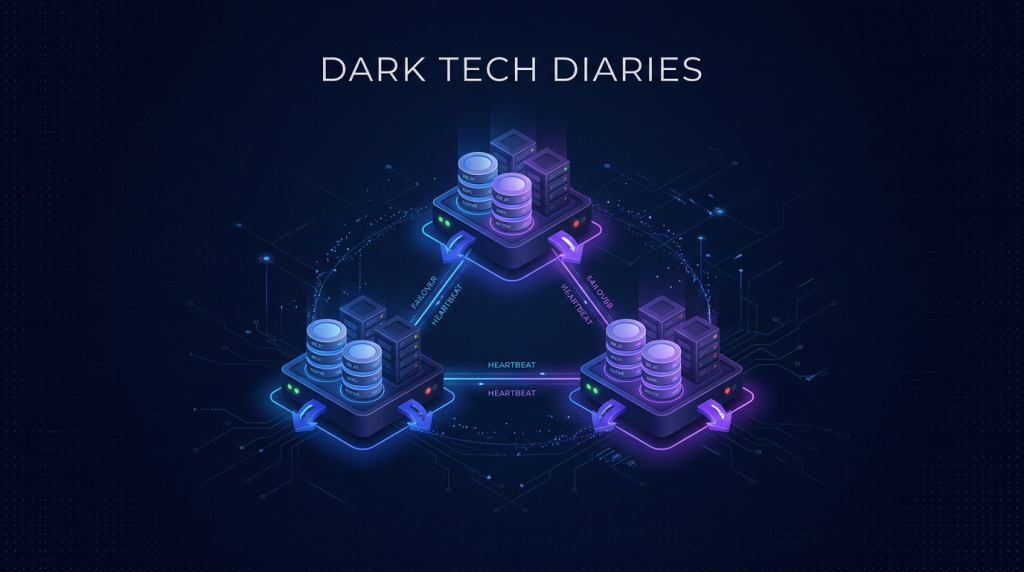
- Redis Sentinel = high availability cho Redis: 1 master + 2 replica + 3 sentinel quorum.
- Khi master chết, sentinel tự promote 1 replica thành master mới trong 30 giây, app không cần can thiệp.
- Cần tối thiểu 3 node (3 VPS riêng) để quorum vote, tránh split-brain.
- Client app dùng redis-py hoặc ioredis với sentinel mode, tự detect master mới.
- Phù hợp app cần <1 phút downtime cho cache/session/queue, chưa cần Redis Cluster sharding.
App production có 5000 user online, session lưu Redis. VPS master Redis sập do disk full lúc 3h sáng. Cache, session, queue, rate limit đều biến mất. User logout hàng loạt, payment đang process bị rollback, queue email/SMS chậm trễ. Người trực bị gọi điện 2 tiếng để mount disk mới và restore. Tối nay nhậu xong không ngủ được. Bài toán: làm sao Redis không sập kèm theo cả app khi 1 VPS chết?
Đáp án: Redis Sentinel. Topology 1 master + 2 replica + 3 sentinel trên 3 VPS riêng, mất 1 VPS bất kỳ, app vẫn chạy. Bài này hướng dẫn setup từng bước: prepare 3 VPS, cài Redis 7, cấu hình master-replica, cấu hình sentinel, test failover, cấu hình client. Không quá phức tạp, một dev backend trung cấp đọc xong có thể deploy production trong 2 giờ.
Sentinel vs Cluster: chọn cái nào?
| Feature | Sentinel | Cluster |
|---|---|---|
| High availability | Có | Có |
| Sharding (chia data nhiều node) | Không | Có |
| Số node tối thiểu | 3 (1 master + 2 replica) | 6 (3 master + 3 replica) |
| Complexity | Trung bình | Cao |
| Phù hợp khi | Dataset < 50 GB, cần HA | Dataset lớn, cần scale write |
| Client lib hỗ trợ | Hầu hết | Cần lib hiểu cluster |
90% startup chọn Sentinel vì dataset thường dưới 50 GB và đủ chạy trên 1 RAM lớn. Khi scale lên 100 GB+ hoặc cần write throughput cực cao, mới chuyển Cluster. Bài này tập trung Sentinel.
Topology 3 node và phân vai trò
| Node | IP | Vai trò Redis | Sentinel |
|---|---|---|---|
| vps1 | 10.0.0.11 | master (lúc khởi tạo) | sentinel 1 |
| vps2 | 10.0.0.12 | replica 1 | sentinel 2 |
| vps3 | 10.0.0.13 | replica 2 | sentinel 3 |
Mỗi VPS chạy 1 redis-server + 1 redis-sentinel. Tổng 6 process trên 3 máy. Khi master ở vps1 chết, sentinel ở vps2 và vps3 vote (cần ít nhất 2 phiếu), promote replica thành master. Client tự reconnect tới master mới.
Yêu cầu VPS: 4 GB RAM mỗi node là tối thiểu cho dataset 1-2 GB. Đặt 3 VPS ở cùng datacenter cho latency thấp, hoặc 2 cùng + 1 khác cho disaster recovery. Khuyến nghị mạng private network giữa 3 VPS để bảo mật và tốc độ.
Cài Redis trên 3 node
# Trên cả 3 VPS, Ubuntu 22/24 hoặc AlmaLinux 9
# AlmaLinux 9
sudo dnf install -y redis

# Ubuntu / Debian
sudo apt update && sudo apt install -y redis-server

# Kiểm tra
redis-server --version
Nếu cần Redis 7+ mà repo OS chưa có, thêm repo Redis chính thức:
# Ubuntu
curl -fsSL https://packages.redis.io/gpg | sudo gpg --dearmor -o /usr/share/keyrings/redis-archive-keyring.gpg
echo "deb [signed-by=/usr/share/keyrings/redis-archive-keyring.gpg] https://packages.redis.io/deb $(lsb_release -cs) main" | sudo tee /etc/apt/sources.list.d/redis.list
sudo apt update && sudo apt install -y redis
Cấu hình master trên vps1
Sửa /etc/redis/redis.conf:
bind 0.0.0.0
port 6379
protected-mode yes
requirepass StrongRedisPasswordChangeMe
masterauth StrongRedisPasswordChangeMe

# Persistence
appendonly yes
appendfsync everysec

# Snapshot
save 900 1
save 300 10
save 60 10000

# Memory
maxmemory 3gb
maxmemory-policy allkeys-lru

# Cluster network
tcp-keepalive 60
timeout 0

# Logging
loglevel notice
logfile /var/log/redis/redis.log
Quan trọng: masterauth giống requirepass để replica login được sau khi promoted thành master. Quên cái này là tham vọng failover sụp đổ.
sudo systemctl restart redis
sudo systemctl enable redis

# Test
redis-cli -a StrongRedisPasswordChangeMe ping
Cấu hình replica trên vps2 và vps3
Sửa /etc/redis/redis.conf trên 2 node, giống vps1 nhưng thêm:
replicaof 10.0.0.11 6379
replica-read-only yes
Restart redis. Sau 5-10 giây, replica đồng bộ data từ master. Verify bằng:
# Trên vps1 (master)
redis-cli -a StrongRedisPasswordChangeMe info replication
# Output:
# role:master
# connected_slaves:2
# slave0:ip=10.0.0.12,port=6379,state=online
# slave1:ip=10.0.0.13,port=6379,state=online

# Test ghi master, đọc replica
redis-cli -a ... -h 10.0.0.11 set mykey "hello"
redis-cli -a ... -h 10.0.0.12 get mykey   # "hello"
Cấu hình Sentinel trên 3 node
Sửa /etc/redis/sentinel.conf giống nhau trên cả 3 node:
port 26379
sentinel monitor mymaster 10.0.0.11 6379 2
sentinel auth-pass mymaster StrongRedisPasswordChangeMe
sentinel down-after-milliseconds mymaster 5000
sentinel failover-timeout mymaster 30000
sentinel parallel-syncs mymaster 1
sentinel resolve-hostnames no
sentinel announce-hostnames no

logfile /var/log/redis/sentinel.log
Giải thích các giá trị:
monitor mymaster 10.0.0.11 6379 2: theo dõi master vps1, cần 2 sentinel đồng ý mới quyết failover (quorum).down-after-milliseconds 5000: 5 giây không ping được coi như chết.failover-timeout 30000: timeout cho 1 lần failover, sau đó retry.parallel-syncs 1: chỉ 1 replica đồng bộ master mới tại 1 thời điểm (tránh quá tải).
Start sentinel:
sudo systemctl enable --now redis-sentinel

# Verify
redis-cli -p 26379 sentinel master mymaster
# Output có host, port, num-slaves, num-other-sentinels, ...
Test failover thủ công
# Trên 1 sentinel bất kỳ
redis-cli -p 26379 sentinel failover mymaster

# Đợi 10-30 giây, kiểm tra:
redis-cli -p 26379 sentinel master mymaster
# Field "ip" bây giờ là vps2 hoặc vps3 (master mới)

# Trên VPS cũ (vps1), redis bây giờ là replica
redis-cli -a ... info replication
# role:slave
Test thật bằng cách sudo systemctl stop redis trên vps1. Đợi 5 giây, sentinel detect down, vote, promote replica. Total failover ~ 10-20 giây. Khi bật lại vps1, nó tự join làm replica của master mới.
Client config Python (redis-py)
from redis import Sentinel

sentinel = Sentinel(
    [("10.0.0.11", 26379), ("10.0.0.12", 26379), ("10.0.0.13", 26379)],
    socket_timeout=0.5,
    sentinel_kwargs={"password": "StrongRedisPasswordChangeMe"},
)

# Lấy connection master cho write
master = sentinel.master_for("mymaster", password="StrongRedisPasswordChangeMe")
master.set("foo", "bar")

# Lấy connection replica cho read
replica = sentinel.slave_for("mymaster", password="StrongRedisPasswordChangeMe")
val = replica.get("foo")
Client tự gọi sentinel để biết master hiện tại. Khi failover, lần connection tiếp theo tự switch sang master mới. Không cần restart app.
Client config Node.js (ioredis)
import Redis from "ioredis";

const redis = new Redis({
  sentinels: [
    { host: "10.0.0.11", port: 26379 },
    { host: "10.0.0.12", port: 26379 },
    { host: "10.0.0.13", port: 26379 },
  ],
  name: "mymaster",
  password: "StrongRedisPasswordChangeMe",
  sentinelPassword: "StrongRedisPasswordChangeMe",
});

await redis.set("foo", "bar");
const v = await redis.get("foo");
Monitoring HA
- Prometheus redis_exporter trên mỗi node, scrape mỗi 15s.
- Grafana dashboard "Redis Sentinel": role, replica lag, ops/sec, memory, hit rate.
- Alert Telegram/Slack: master down 30s, replica lag > 5s, memory > 80%.
- Uptime Kuma ping mỗi sentinel mỗi phút, alert nếu sentinel down.
- Log sentinel events vào Loki: failover, +sdown, +odown, +promoted-slave.
Backup an toàn
HA bảo vệ khỏi node down, không bảo vệ khỏi xoá dữ liệu nhầm. Cần backup riêng:
- RDB snapshot mỗi 6 tiếng trên 1 replica (đỡ tải master), sync sang B2/R2 bằng restic.
- AOF append-only file flush mỗi giây - đảm bảo durability gần real-time.
- Test restore mỗi quý: stop redis, đặt file dump.rdb backup vào /var/lib/redis, start lại.
- Giữ 7 daily + 4 weekly + 6 monthly backup theo policy restic.
Bẫy thường gặp
| Triệu chứng | Nguyên nhân | Cách fix |
|---|---|---|
| Replica không sync được | Thiếu masterauth | Set masterauth = requirepass trên cả 3 node |
| Sentinel không detect down | down-after-milliseconds quá cao | Hạ xuống 5000, không thấp hơn 3000 |
| Split-brain (2 master) | Network partition + chỉ 2 node | Bắt buộc 3+ node, quorum 2 |
| Client cache master cũ | Lib không refresh từ sentinel | Restart client connection pool, dùng lib mới |
| Failover quá nhanh / chậm | failover-timeout sai | 30000ms cho production, 10000 cho dev |
Khi nào chuyển từ Sentinel sang Cluster?
- Dataset vượt RAM 1 node lớn nhất bạn mua được (vd 64 GB).
- Write throughput vượt 50k ops/sec, master saturate.
- Cần geographic distribution (multi-region).
- Cần shard data theo key prefix để isolate workload.
Đa số startup VN không cần Cluster trong 2-3 năm đầu. Sentinel là sweet spot: đủ HA, không quá phức tạp, debugging dễ.
3 VPS riêng cho Redis Sentinel quorum chuẩn HA
Cloud VPS TND sẵn AlmaLinux 9, Ubuntu 22/24, Debian 12/13. SSD CEPH, snapshot 1-click, backup hằng ngày, network 200Mbps trong nước. Mua 3 con VPS 4GB RAM cùng datacenter, private network giữa các node, đủ chuẩn production Redis Sentinel.
Xem 8 cấu hình Cloud VPS →FAQ
Có thể chạy Sentinel cùng VPS với Redis không?
Có. Mỗi VPS chạy đồng thời redis-server (port 6379) + redis-sentinel (port 26379). Đây là pattern phổ biến nhất, không cần VPS riêng cho sentinel. Tuy nhiên cho production critical, nên có thêm 1-2 sentinel chạy trên VPS dev/staging không liên quan để tăng độ tin cậy quorum.
2 VPS có đủ Sentinel HA không?
Không. Quorum cần odd number (3, 5, 7) để tránh tie. Với 2 sentinel, khi 1 chết, sentinel còn lại không thể quyết failover. Tối thiểu 3, lý tưởng 5 cho production critical. Nếu chỉ có 2 VPS, đặt 1 sentinel thứ 3 trên máy dev hoặc 1 VPS nhỏ riêng làm "arbiter".
Failover mất bao lâu trong thực tế?
Thường 10-30 giây với cấu hình mặc định: 5s detect down + 5-10s vote quorum + 5-10s promote + 5-10s reconfigure replicas. App được thiết kế retry với exponential backoff sẽ tự reconnect mượt mà. App không retry sẽ throw connection error trong khoảng đó.
Có cần TLS giữa các node Redis không?
Khi 3 VPS cùng datacenter và dùng private network nội bộ, không bắt buộc TLS - đỡ overhead. Khi cross-datacenter hoặc qua internet public, bắt buộc TLS. Redis 6+ hỗ trợ native TLS, config thêm tls-port, tls-cert-file, tls-key-file, tls-ca-cert-file. Client cũng phải connect bằng tls.
Tôi cần Redis HA hay Redis Managed như Upstash/Redis Cloud?
Managed Redis tốt cho team không có sysadmin, dataset nhỏ, traffic vừa. Cost tăng nhanh khi vượt 5 GB hoặc 5k ops/sec. Self-host Sentinel rẻ hơn 5-10x cho dataset 10-50 GB và team có khả năng vận hành. Chọn managed cho MVP, migrate sang self-host khi cost trở nên đáng kể.