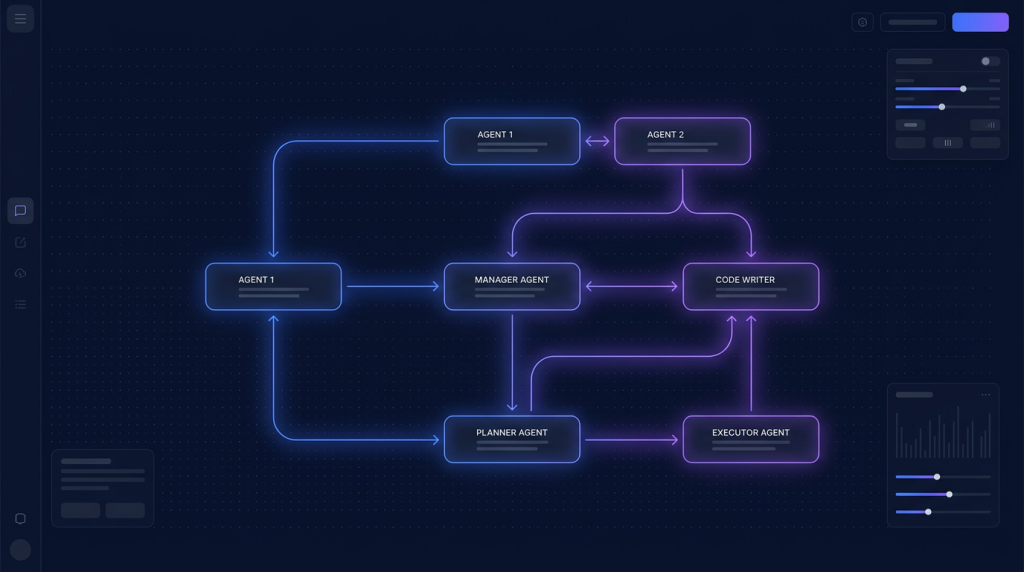
- AutoGen Studio v2 (Microsoft) là tool GUI cho framework AutoGen multi-agent, chạy localhost qua web.
- VPS 4GB Ubuntu chạy được full stack: Python + SQLite + UI Next.js.
- Gắn được Claude API, GPT API, local Ollama. Build team agent: planner + coder + tester.
- Use case: tự động hoá code review, sinh test case, data analysis, research summary.
- Setup 25 phút: pip install + autogenstudio ui --port 8081, Caddy reverse proxy HTTPS.
Multi-agent AI là xu hướng nóng 2026: thay vì 1 prompt 1 LLM, bạn xây team agent với role khác nhau (planner, coder, reviewer, tester) cùng làm việc, debate, hoàn thành task lớn. AutoGen của Microsoft là framework đứng top, AutoGen Studio là UI để dev team agent không cần code Python từ đầu.
Bài này hướng dẫn self-host AutoGen Studio trên VPS Ubuntu, gắn Claude/GPT API, demo workflow code review tự động. Phù hợp dev VN muốn explore multi-agent mà chưa muốn code Python framework trực tiếp.
Mục tiêu cuối bài: bạn có AutoGen Studio chạy HTTPS trên VPS, gắn 2 model (Claude Sonnet + GPT-5-mini), build được 1 team 3 agent đầu tiên (planner + coder + tester), run task thực tế.
1. AutoGen Studio là gì?
AutoGen Studio là UI web (Next.js + FastAPI) cho framework AutoGen Python. Thay vì viết Python script khai báo agent + tool, bạn drag drop trong UI:
- Tạo Model (LLM endpoint): Claude, GPT, Ollama local.
- Tạo Agent (system prompt + model + tools): role coder, role tester...
- Tạo Team (group chat hoặc round-robin các agent): workflow logic.
- Tạo Session: chạy task, xem conversation đa agent realtime.
Export ra Python code khi production. AutoGen Studio chỉ là UI prototyping, deploy production vẫn dùng autogen-agentchat lib trực tiếp.
2. Yêu cầu VPS
- RAM: 4GB tối thiểu (Python + Next.js + SQLite + browser overhead).
- vCPU: 2-4.
- SSD: 40GB.
- Ubuntu 24.04 LTS, Python 3.11+, Node.js 22.
- Domain: autogen.your-domain.com (cho HTTPS auto SSL).
3. Cài Python 3.11 và AutoGen Studio
# Ubuntu 24.04 sẵn Python 3.12, nhưng AutoGen Studio 2026 ổn định nhất Python 3.11
sudo apt update
sudo apt install -y python3.11 python3.11-venv python3-pip

# Tạo virtualenv
python3.11 -m venv /opt/autogen-venv
source /opt/autogen-venv/bin/activate

# Cài AutoGen Studio (v0.4+)
pip install -U autogenstudio
pip install -U autogen-ext[anthropic,openai,ollama]
autogen-ext là extension chứa client cho từng provider. Cài đầy đủ để switch model dễ. SQLite dùng làm DB mặc định, đủ cho cá nhân; có thể upgrade Postgres sau.
4. Chạy AutoGen Studio
# Khởi động UI server
autogenstudio ui --host 0.0.0.0 --port 8081

# Output:
# AutoGen Studio v0.4.x
# Listening on http://0.0.0.0:8081
# Database: ~/.autogenstudio/database.sqlite
Truy cập http://1.2.3.4:8081 từ browser laptop. Web UI có 4 tab chính: Build (tạo Model/Agent/Team/Tool), Playground (test session), Gallery (mẫu sẵn), Settings.
5. Caddy reverse proxy HTTPS
# Cài Caddy
sudo apt install -y caddy

# /etc/caddy/Caddyfile
autogen.your-domain.com {
    reverse_proxy localhost:8081
    encode gzip
    basicauth {
        admin $2a$14$hashed_password_here
    }
}

sudo systemctl reload caddy
AutoGen Studio không có auth built-in. Bắt buộc bọc HTTP Basic Auth qua Caddy hoặc Nginx, không bao giờ expose port 8081 public. Generate hash: caddy hash-password.
6. Systemd service cho auto-restart
# /etc/systemd/system/autogen-studio.service
[Unit]
Description=AutoGen Studio
After=network.target

[Service]
Type=simple
User=autogen
WorkingDirectory=/home/autogen
Environment=PATH=/opt/autogen-venv/bin
ExecStart=/opt/autogen-venv/bin/autogenstudio ui --host 127.0.0.1 --port 8081
Restart=on-failure
RestartSec=5

[Install]
WantedBy=multi-user.target
sudo systemctl daemon-reload
sudo systemctl enable --now autogen-studio
sudo systemctl status autogen-studio7. Setup model Claude API
- Web UI -> Build -> Models -> New Model.
- Provider: AnthropicChatCompletionClient.
- Model: claude-sonnet-4-7-20260301.
- API Key: paste sk-ant-api03-xxx (lấy từ console.anthropic.com).
- Temperature: 0.7.
- Save -> Test với prompt "Hello".
Lặp lại với OpenAI GPT-5-mini (rẻ hơn, dùng cho agent verify). Local Ollama cũng được nếu host model 7B trên VPS.
8. Build agent đầu tiên: Coder
- Build -> Agents -> New Agent.
- Name: PythonCoder.
- Description: "Viết Python code chất lượng cao, test đầy đủ".
- System Message: "Bạn là Python senior developer. Khi nhận task, output: 1) plan ngắn 2) code complete 3) usage example. Code phải có type hint, docstring."
- Model Client: chọn Claude Sonnet.
- Tools: PythonCodeExecutor (built-in) để chạy code sandbox.
9. Build team multi-agent: Planner + Coder + Tester
- Tạo 3 agent: Planner (Claude, system: chia task lớn thành bước), Coder (Claude, viết code), Tester (GPT-5-mini, viết unit test + chạy).
- Build -> Teams -> New Team -> Type: RoundRobinGroupChat.
- Add 3 agent theo thứ tự: Planner -> Coder -> Tester.
- Termination condition: TextMentionTermination khi thấy "DONE".
- Max turns: 10.
10. Run task thực tế
- Playground -> chọn team vừa tạo.
- Prompt: "Viết function Python tính phí ship VN dựa trên cân nặng (g) và khoảng cách (km). Có unit test cover edge case."
- Quan sát: Planner đề xuất plan, Coder viết code, Tester viết test + chạy, nếu fail thì loop lại Coder fix.
- Kết quả: trong 4-6 turn, có function + test đầy đủ, conversation log lưu trong DB.
11. Export sang Python code production
# Từ team đã tạo, Export Python
# Output ví dụ:
import asyncio
from autogen_agentchat.teams import RoundRobinGroupChat
from autogen_ext.models.anthropic import AnthropicChatCompletionClient

async def main():
    model = AnthropicChatCompletionClient(model="claude-sonnet-4-7-20260301")
    planner = AssistantAgent(name="Planner", model_client=model, system_message="...")
    coder = AssistantAgent(name="Coder", model_client=model, system_message="...")
    tester = AssistantAgent(name="Tester", model_client=model, system_message="...")
    team = RoundRobinGroupChat([planner, coder, tester], max_turns=10)
    result = await team.run(task="...")
    print(result)

asyncio.run(main())
Code này chạy headless trên VPS hoặc tích hợp vào n8n/FastAPI service. Studio chỉ dùng để prototype, production deploy code Python trực tiếp gọn nhẹ hơn.
12. Use case thực tế
- Auto code review: agent đọc PR diff, comment risk + suggest improve.
- Sinh test case: 1 agent đọc function, agent khác viết test, agent thứ ba chạy verify.
- Research summary: agent 1 search web, agent 2 đọc paper, agent 3 viết summary tiếng Việt.
- Data analysis: agent viết SQL query, agent verify result, agent viết report markdown.
- Customer support tier 1: agent 1 phân loại ticket, agent 2 draft reply, human approve.
13. Tối ưu cost
- Mix model: dùng Sonnet cho agent quan trọng (Planner, Coder), Haiku/GPT-5-mini cho agent verify đơn giản.
- Max turns cap: 8-10 turn max, tránh agent loop infinite.
- Termination condition rõ ràng (TextMention "DONE", max time).
- Cache prompt: AutoGen 0.4+ support prompt caching Claude, giảm 60-80% cost cho repeat task.
- Monitor token usage qua DB SQLite, alert khi vượt budget tháng.
VPS 4GB chạy AutoGen Studio + multi-agent 24/7
Cloud VPS TND Ubuntu 24.04, SSD CEPH, snapshot 1-click, backup hằng ngày, network 200Mbps trong nước. Đủ resource cho Python + Next.js UI + SQLite, latency thấp tới Anthropic/OpenAI cho agent realtime.
Xem 8 cấu hình Cloud VPS →FAQ
AutoGen Studio khác Langflow/Flowise như thế nào?
Cả 3 đều là UI prototyping AI agent. Langflow/Flowise focus single-agent với chain (LangChain). AutoGen Studio focus multi-agent conversation với role chia rõ. Khi task cần debate, planning, đa expertise -> AutoGen tốt hơn. Khi task pipeline đơn giản (input -> retrieve -> LLM -> output) -> Langflow đủ.
Có chạy được AutoGen Studio với local LLM (Ollama)?
Có. Provider OllamaChatCompletionClient (autogen-ext[ollama]), endpoint http://localhost:11434. Lưu ý: local model 7B kém Claude/GPT trong multi-agent vì khó follow JSON tool call format. Khuyến nghị Qwen 2.5 32B Q4 trở lên cho ổn định, cần VPS 32GB RAM.
Có nên dùng AutoGen Studio production?
Không. Studio là UI prototype, có bug, không có auth production-grade, DB SQLite không scale. Production nên export Python code, deploy qua FastAPI hoặc gọi từ n8n. Studio chỉ để team thiết kế workflow agent, demo cho stakeholder, rồi export.
Có thể tích hợp tool custom (gọi DB, API nội bộ)?
Có. Build -> Tools -> New Tool, viết Python function, expose schema. Agent có thể gọi tool đó như normal function. Hoặc dùng MCP server: AutoGen 0.4+ hỗ trợ MCP, cho phép gắn server Postgres/GitHub/Linear y hệt Claude Code.
Multi-agent có tốn cost gấp nhiều lần single agent?
Có, thường 3-5x. Mỗi agent đọc full conversation context, nhân số agent. Bù lại: chất lượng output cao hơn nhiều cho task phức tạp, ít cần human iterate. Tổng cost end-to-end (token + dev time) có khi rẻ hơn nếu task được multi-agent giải đúng ngay lần đầu.
Có giới hạn số agent trong 1 team không?
Không giới hạn cứng. Thực tế >5 agent thì conversation chaotic, context phình to. Best practice: 2-4 agent rõ vai trò, max 5. Cho task siêu phức tạp, dùng nested team (1 team là sub-agent của team lớn hơn) thay vì flat list 10 agent.